Unofficial community tool · Age of Mythology: Retold

The numbers your
broadcast is missing.

Obelisk is a CaptureAge-style live spectator overlay for AoM: Retold. Both players' resources, army value, unit composition, upgrades, ELO and eAPM — on a clean broadcast bar, rendered over the game or straight into OBS.

v1.0.4 · Windows 10/11 · 64-bit · 101 MB · Free · nothing to install

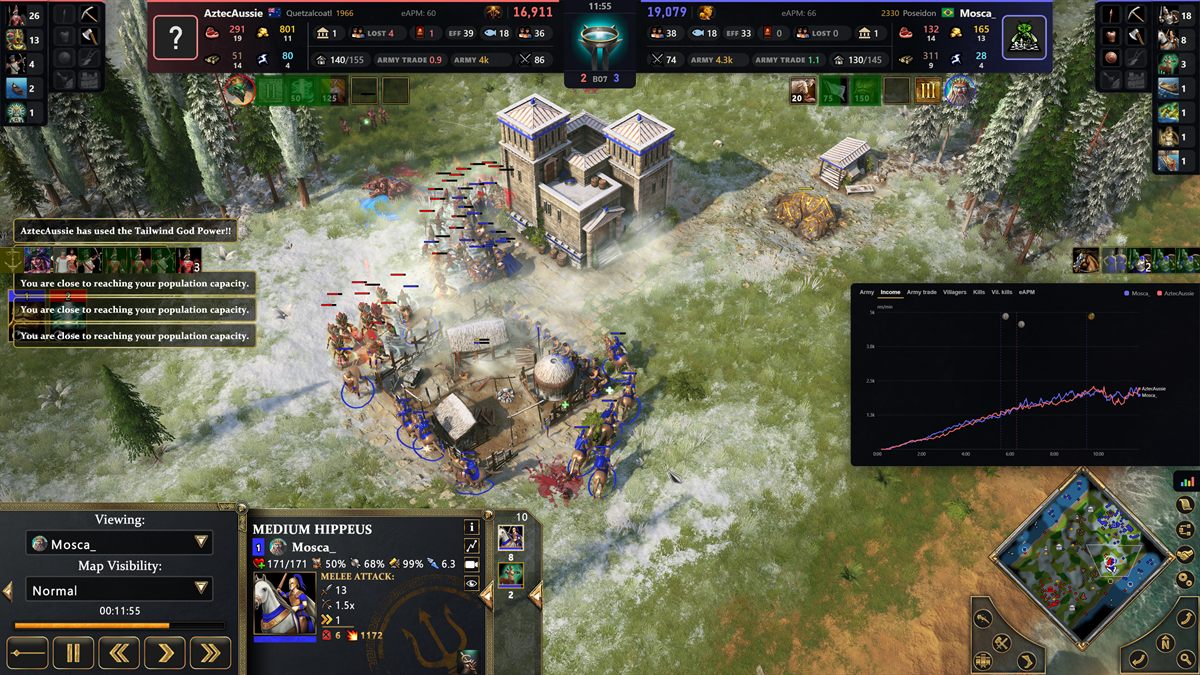
Obelisk running over a live Age of Mythology: Retold match. A broadcast bar spans the top of the screen with both players' resources, villager and fishing counts, worker efficiency, army value and army trade ratio, either side of a match clock and series score. A live income chart is docked at the lower right.
Obelisk over a live match — the broadcast bar across the top, the stat chart docked at the right.
Read-onlyNever writes to the game
No injectionNo DLLs, no debugger attached
Observer onlyGated to observing and replays
Free foreverNo account, no telemetry

Everything a caster asks for
mid-cast, already on screen.

Retold gives observers a resource header and nothing else. Obelisk reads the live match and puts the rest of the story on the bar.

Close-up of the Obelisk bar: each player's panel carries resources with gatherer counts, town centers, units lost, worker efficiency, fishing ships, villagers, population, army value and army trade ratio, with the match clock and best-of score in the centre.
Every readout is live and per player. Hovering any figure on the real overlay explains what it means.

Live economy, both players

Food, wood, gold and favor with the number of workers gathering each, villager population, idle workers, and a rolling worker-efficiency figure. Click any resource to flip the whole bar between current stockpiles and match totals.

Army value & the trade ratio

What each player has on the field, priced from the game's own unit costs — with favor weighted, because it arrives an order of magnitude slower than it is spent. Beside it, army killed divided by army lost, so a fight's outcome is a number before the dust settles.

Full unit composition

Every unit each player owns, drawn with the game's own icons and counts, in a strip under their panel. The whole registry is read each poll — not a hand-picked shortlist — so a surprise composition shows up the moment it exists.

Upgrades at a glance

Weapons, armor, shields and ballistics beside gold, wood, farming and the fortified town center — each slot showing the highest tier researched, named and drawn exactly as that civilisation names it.

Identity that fills itself in

ELO, rank, country flag and Steam avatar resolve automatically from the aomstats.io leaderboard. Drop portraits named by in-game alias into one folder and a tournament is configured once, not per match.

eAPM from the real command log

Effective actions per minute per player, read from the recording the game itself writes — not guessed from memory deltas. Works in live matches and in replays.

A timeline you can open mid-cast

A chart panel with every tracked stat over the whole match, age-ups marked with the game's own age icons — for the "how did we get here" beat between fights.

Clock, logo and series score

A centre badge carrying the match clock, your tournament's logo and the best-of series score. It replaces Retold's own scoreboard, which the bundled mod collapses.

One overlay, two ways out.

Both surfaces render the same components through the same state hook — only the transport differs, so your stream can never drift from what you are looking at.

For observing locally

Transparent in-game overlay

A click-through canvas that snaps to the game's client area and follows it as it moves or resizes, in windowed and borderless modes. It hides when the game is not the foreground window and returns when it is — so it never floats over whatever you alt-tabbed to.

  • Never steals input from the game
  • Global caster hotkeys — no alt-tabbing
  • Or pin it to a display and turn snapping off
For broadcasting

OBS browser source

The same overlay served over loopback. Add one browser source, paste the URL, and you are done — the page has a transparent background, so it composites straight over your game capture with no chroma key and no scene gymnastics.

http://127.0.0.1:37401/overlay
  • Unaffected by the game's fullscreen mode
  • Reconnects itself if Obelisk restarts
  • Draws your cursor in the correct layer

Running in about a minute.

  1. Run the download. There is nothing to install — double-click the file. Launch order does not matter either: if the game is not running yet, Obelisk waits and attaches when it appears.
  2. Start observing. The overlay picks up a match or replay within a few seconds of it starting. Nothing to configure per match.
  3. Streaming? Add one browser source. Copy the URL from the Layout & OBS tab, paste it into OBS at your canvas size, and untick "Capture Cursor" on the game source.

Optional: install the bundled clean-spectator mod from the control panel in one click. It collapses Retold's own spectator header so Obelisk's bar replaces it instead of stacking on top of it. Nothing is written to your game folder without that click.

Is this safe to run?

The honest answer, because you are right to ask before running a tool that reads a game's memory.

It only reads. Never writes.

Obelisk calls ReadProcessMemory against AoMRT_s.exe and nothing else. There is no write path in the code, no DLL injection, no code patching, and no debugger is ever attached to the game. It cannot modify your match even by accident.

Why it has to read memory at all.

Retold exposes no sanctioned live-data channel — XS scripting has no file I/O, there is no local telemetry API, and the built-in observer UI publishes nothing externally. External read-only access is the only route to live data that exists.

It shows nothing an observer cannot already see.

Obelisk is built for casters and observers, who already have full vision of the match. It is not a fog-of-war tool, and the shipped build is gated so that it reads in observer and replay contexts.

The shipped helper cannot browse memory.

The memory helper has a calibration mode with general inspection commands, used for finding offsets during development. It is compiled out of release builds entirely — the binary you download has no such commands and speaks only the app's own gated protocol. It can read the handful of routes the overlay needs and nothing else.

Obelisk is an unofficial community tool. It is not affiliated with, endorsed by, or supported by Microsoft, Xbox Game Studios, World's Edge or Forgotten Empires. Age of Mythology is a trademark of its respective owners. Use it at your own discretion.

Download Obelisk

Windows 10 or 11, 64-bit. v1.0.4.

There is no installer — it is a single executable. Put it anywhere and double-click it; removing it is deleting the file. Windows SmartScreen will likely warn on first run, because the build is not code-signed: click More info → Run anyway.

Questions

Does this work while I am playing, or only observing?

It is built for observing and casting. The shipped build reads in observer and replay contexts — it is not a tool for gaining information in your own ranked games, and it is not designed to be one.

Do I need the game in windowed mode?

Only for the transparent in-game overlay — exclusive fullscreen takes over the display and paints over any external overlay, which is a Windows compositing rule rather than an Obelisk limitation. The OBS browser source has no such constraint and works in any mode.

A patch just landed and the numbers went blank. Now what?

Game patches move memory addresses. Obelisk keeps every offset in a versioned config resolved by signature scanning, so a patch is answered with a new build rather than a rewrite — usually a quick turnaround. Until then the overlay degrades honestly: readouts that cannot be trusted collapse instead of showing stale numbers, and names, gods, ELO and the series score keep rendering so a broadcast survives.

Does it show 2v2 and team games?

Every player in the match is reported. The broadcast bar is laid out for the two-player case; larger games are readable, but the bar is at its best in 1v1.

Can I use my own tournament logo and player portraits?

Yes. The centre badge takes an uploaded logo, and portraits are image files named by in-game alias dropped into one folder — ship it once for the event and the streamer configures nothing per match. Players without an image fall back to their Steam avatar, then to initials.

Does it phone home?

No telemetry and no account. The only outbound requests are to the public aomstats.io leaderboard dump for ELO and country data, and to Steam for avatar images.

Mac or Linux?

Windows only. The overlay reads a Windows game process through Windows APIs, so there is no meaningful port.

Put it on your stream.

Download for Windows

v1.0.4 · Windows 10/11 · one file, nothing installed
